Nautilus: streamlining Amazon's security investigations
The The Risk Management Systems team at Amazon needed a new and scalable solution for security management and investigation. I led the design of Nautilus, an Amazon internal investigation platform which launched in 2018.
My role encompassed the full design lifecycle: from conducting in-depth user research and defining the strategic UX vision, to leading design execution and establishing a robust design system. I collaborated closely with product and development teams across 30+ programs, ensuring a consistent and user-friendly experience.
By optimizing the investigator workflow, I significantly increased operational efficiency and improved the accuracy of risk assessments, directly contributing to a safer and more seamless experience for Amazon customers. My design guidelines and research insights were leveraged by designers, product managers, and engineers across the organization.

Efficiency vs. Accuracy
User research revealed three key challenges:
Investigations were entirely manual, requiring individual review of each customer order.
Hundreds of data points needed to be analyzed in under a minute, making risk assessment challenging, despite investigators' requests for even more data.
Investigators relied on constantly evolving manual instructions (SOPs) due to the lack of supportive tools, impacting decision accuracy.
-

Buyer Risk Investigator
“We are tasked with sorting through copious amounts of data to make informed decisions. The use of a tool with a great UX enables us to quickly analyze complex situations and make quality decisions in a timely manner.”
-

Buyer Risk Investigator
“The most important ones are the most confusing. For example, e-checks, bad debt or chargebacks. The SOP should not say “do this or this”, it should be more clear as to what action I’m supposed to take.”
-

Buyer Risk Investigator
“When we are able to diagnose the root cause of issues efficiently and take the best course of action it results in a much better customer experience and assures that both buyers and sellers are being protected on the platform”

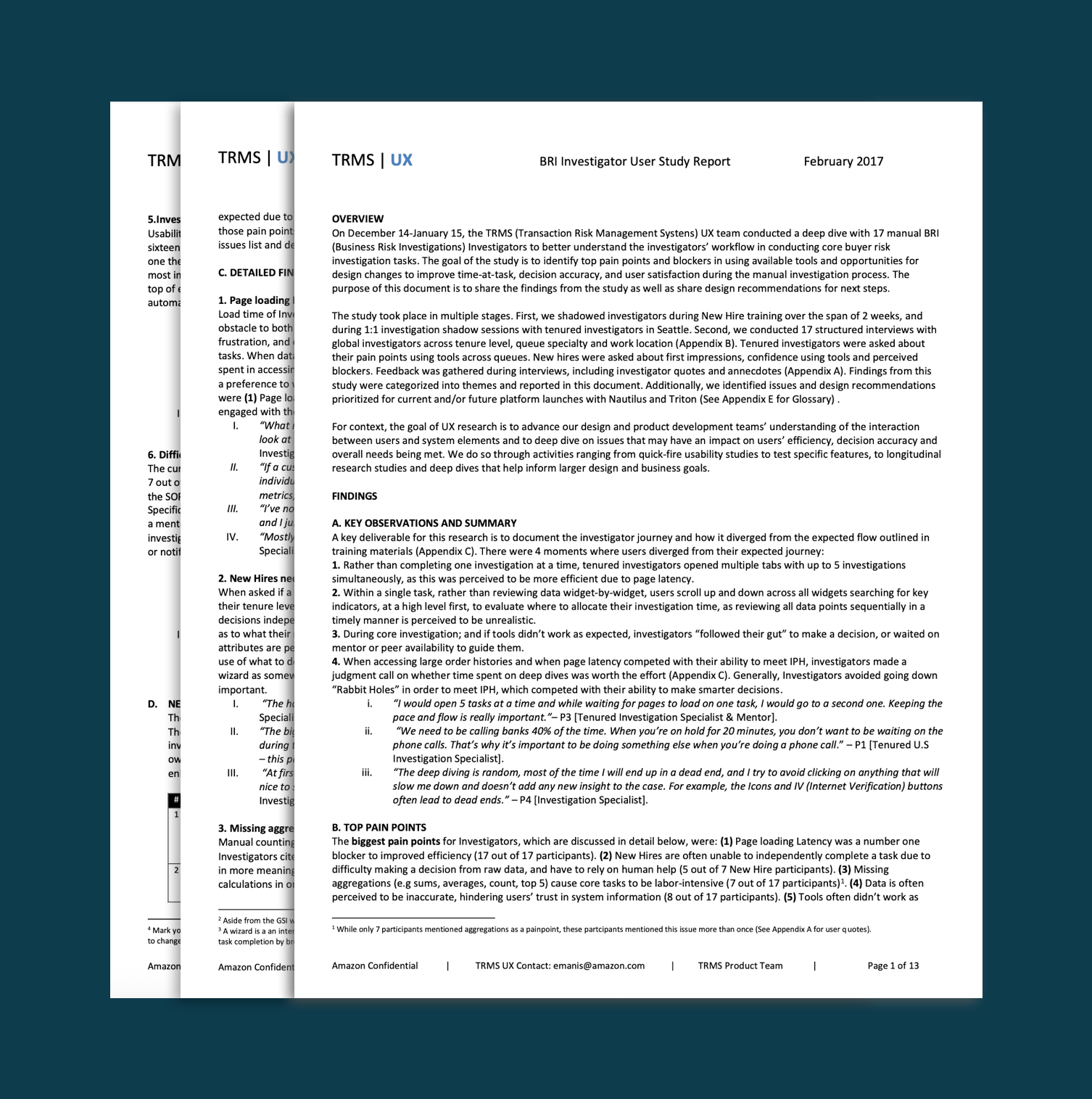
I conducted 4 week long research project across a global investigator user base.
defining goals
The project aimed to
1) quickly transition from legacy systems
2) significantly improve investigation efficiency and accuracy
3) reduce overall queue volume.
My design focus was to enable data visualization and analysis, facilitating insightful and efficient decision-making for investigators."
Short term goal Deprecate legacy tools and transfer functionality to new platform
Long term business goal: 1) Significantly improve investigator efficiency and accuracy. 2) Reduce the queue volume. 3) Improve accuracy (quality) of the manual investigation process. 4) Improve investigator efficiency.
My design goal was focused on empowering users to visualize and analyze data, enabling them to derive meaningful insights and make efficient, accurate decisions."
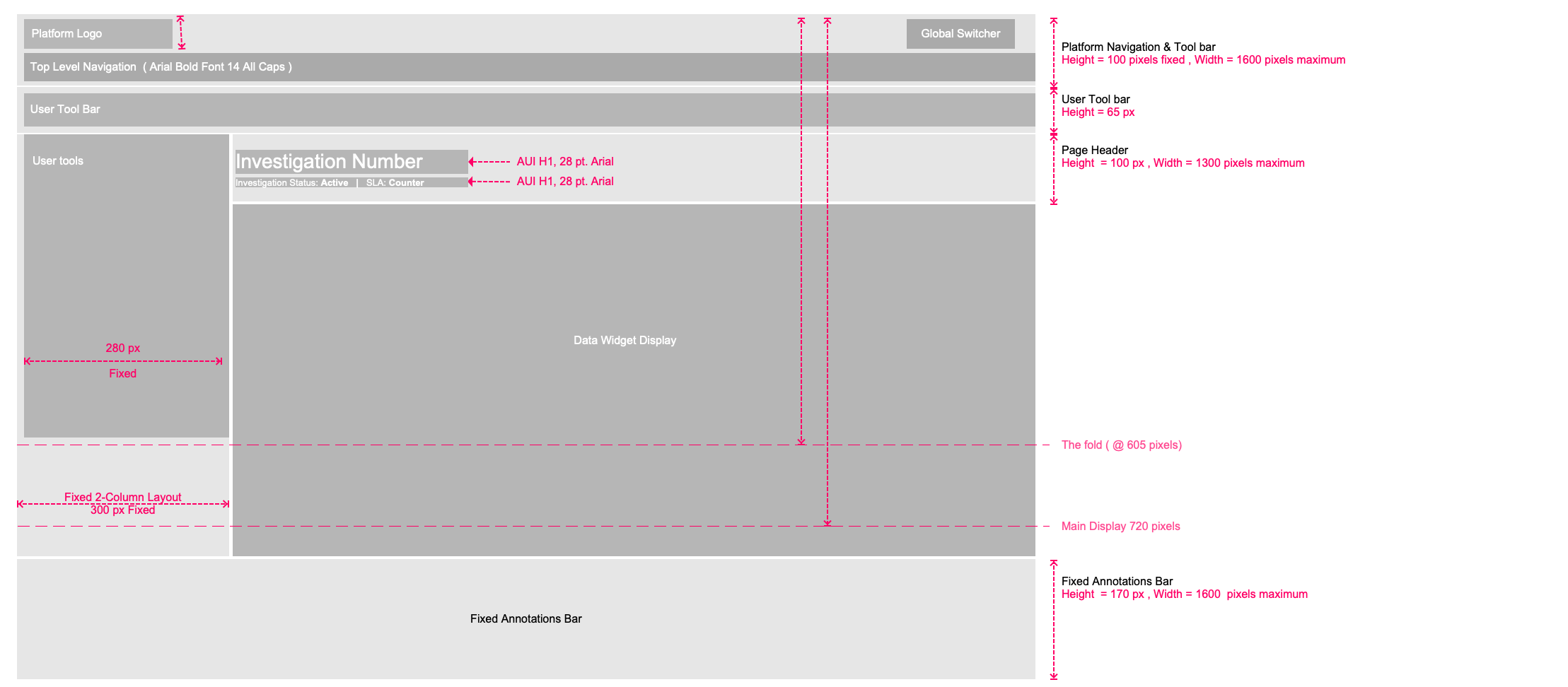
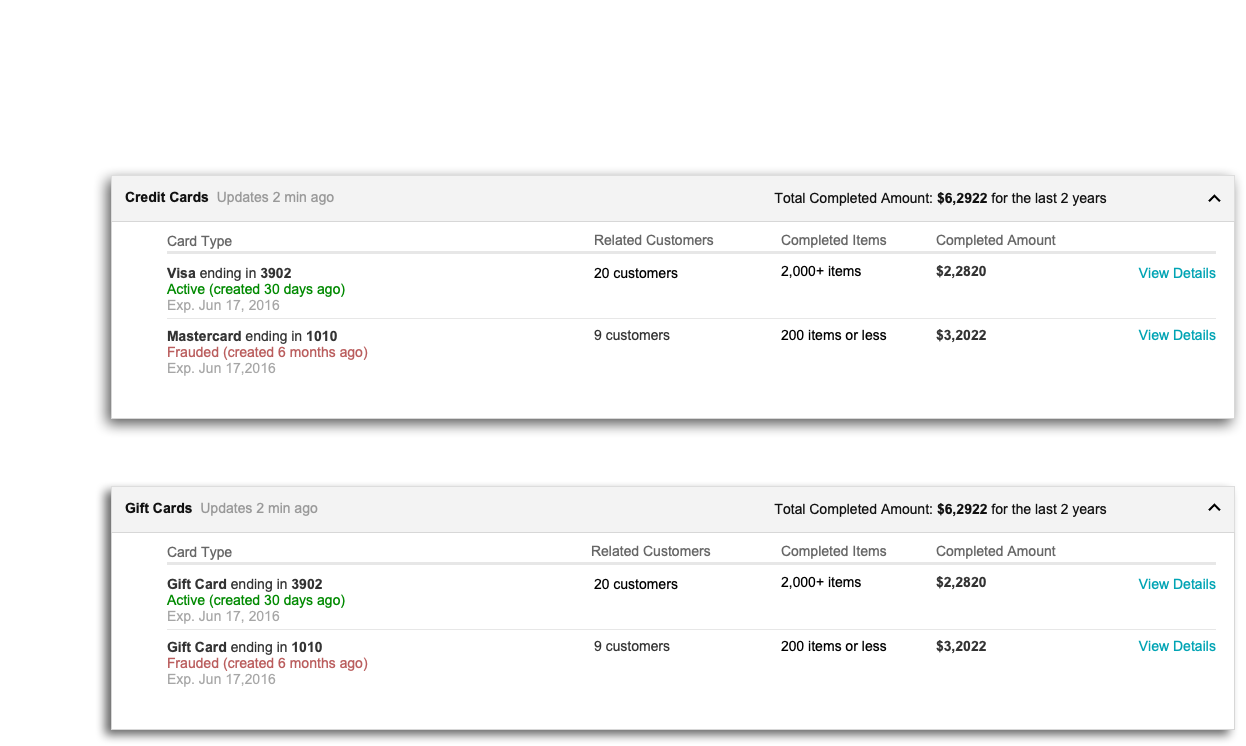
Table Displays
breaking down complexity
Data analysis, concept design, user feedback
framing
Given the highly specialized nature of manual investigations, this meant it was crucial to work directly with end users. I attended investigator training sessions, shadowed their work and led a global research study to understand their worldview.
In the past, developers scrappily created solutions in siloed teams. This meant that a holistic investigator experience was at risk - Workflows getting overly complex with little thought into the overall information architecture of the platform and task completion time. Working with one-off stories in SIMs sometimes means that solutions get chopped off into separate SIMs, decisions get made last minute and the intended user flow is lost.
Over time this led to an overly complex tool that was not easy to understand, let alone write requirements for improving. We were not sure how investigators reached their outcomes and what process or workflow they followed.
We wanted to optimize the experience to show only what's needed by the human eye. Our current process required 6+ weeks of training, human help and efficiency metrics they needed to meet.
The challenge here is as tools got more complex, so did our training materials, our SOPs, and the number of investigators needed to process all of it. We needed a holistic solution that streamlined manual investigation.
Problems I wanted to solve were:
1. How do I support 30+ teams with separate workflows building on this platform?
2. How to solve the long-term problem for investigators to improve accuracy and efficiency using tools?
3. How can I create a consistent look and feel without re-inventing the Amazon Wheel or having to hire an army of designers? :)
I started doing a few things in parallel.
5
themes
70
Anecdotes
11
Design recommendations
User Interviews: Understanding Pain points
I talked with 17 investigators.
This helped us understand requirements from a user's point of view and was eye opening for leadership across various teams
(OPS, TECH, PRODUCT, TRAINING AND ONBOARDING) and fed into 3YP ideas and other project initiatives for the organization.
We had user stories captured in SIMs but they came from functionality in legacy tools
We needed to ask how a user-centered process can lead to better outcomes, particularly for the future of manual tools.
ideation
5
component types
70
Anecdotes
30
Programs
Ideation for long term goals: Defining risk indicators
We still haven't solve the main problem of the cognitive overload. I was skeptical investigators needed all this data and I wanted to show how they can make a decision with less information. I created 8-minute concepts to pitch for 3YP of ways data points would be aggregated into meaningful risk indicators that users can action on or further drill down into.
I worked with Machine Learning Scientists and Business Analysts to define indicators and tested them directly with users to get quick feedback.
design system
5
component types
70
Anecdotes
30
Programs
Reusable components
We needed to create a component system that optimizes for visual display of key metrics and speeds up development across 30 programs. The team decided to go with reusable widgets that can be leveraged across programs. The challenge was designing them in such a way that was user-centric, knowing that user needs are program-specific.
Platform Framework
An overview helped unblock development in the short term in identifying where features should live and enabled us to have discussions around page type definitions and layout conventions.
Page-level Framework
Creating page-level guidelines that would work across numerous use cases across 30+ programs was challenging. A healthy level of discussion around data density, screen size and real estate with various teams led to a high level of confidence in the proposed template.
Component- Level Framework
We negotiated pixels and padding widths as requests for more columns and more data points accumulated. I helped define distinctions in data types and how and where it should be displayed. My goal was to decrease the number of columns and eliminate horizontal & Vertical scrolling within fixed height widgets, and eliminate over reliance on modal windows.
The choice of working in Axure
Dynamic panels With various moving parts in the design, I relied on Axure's Dynamic Panel and Master Layers to make design changes as well as test clickable prototypes with end users all within a single file. Diagramming the information Architecture of the platform allowed me to create an ordered system that maps to pages and widgets being designed that can holistically fit into the overall. Axure helped in keeping track of all the elements all at once, while creating 'click-ability' in areas where we needed to test with users.
Visual design
To address confusion from excessive iconography and inconsistent color, I created design guidelines, limiting icons to page and row levels, and standardizing color usage for scalability.
outcomes
5
component types
70
Anecdotes
30
Programs
Success measurements
We tracked long-term success with user interaction data and global surveys on usability and satisfaction. I designed the survey strategy and UX-specific questions.
measure user clicks against decision outcome and time at task, as well as HMD feedback on perceived ease of use and overall satisfaction with tools.
Survey to get a pulse on ease of use, perceived reliability of tools and overall satisfaction using Nautilus.
learnings
Key Learnings: Internal User Design
Efficiency vs. Accuracy:
Prioritize decision accuracy over pure efficiency metrics. Understand the broader processes, not just tool usability.
Optimizing for Best Practices:
Guide internal users through clear, structured workflows. Contextual help and training are crucial.
Resist the urge to simply fulfill all user data requests; focus on design-driven solutions.
Usability Fundamentals:
Basic usability guidelines are essential, even for expert users.
Adhere to established conventions to minimize errors and cognitive load.
Managing User Input:
Balance user feedback with a holistic product vision. Avoid over-reliance on "tribal knowledge" or individual requests.
Build and maintain user trust through consistent, reliable tools and data.
Trust is Paramount:
Feature discrepancies and bugs destroy trust. Quick fixes and good communication are vital to maintain trust.

Want to see more of my work?